

An SSD and an HDD both store files, but they work differently. For most everyday computers, an SSD is PC Ninja’s first choice for the main drive. A hard drive can still be useful when you need a lot of storage at a lower cost.
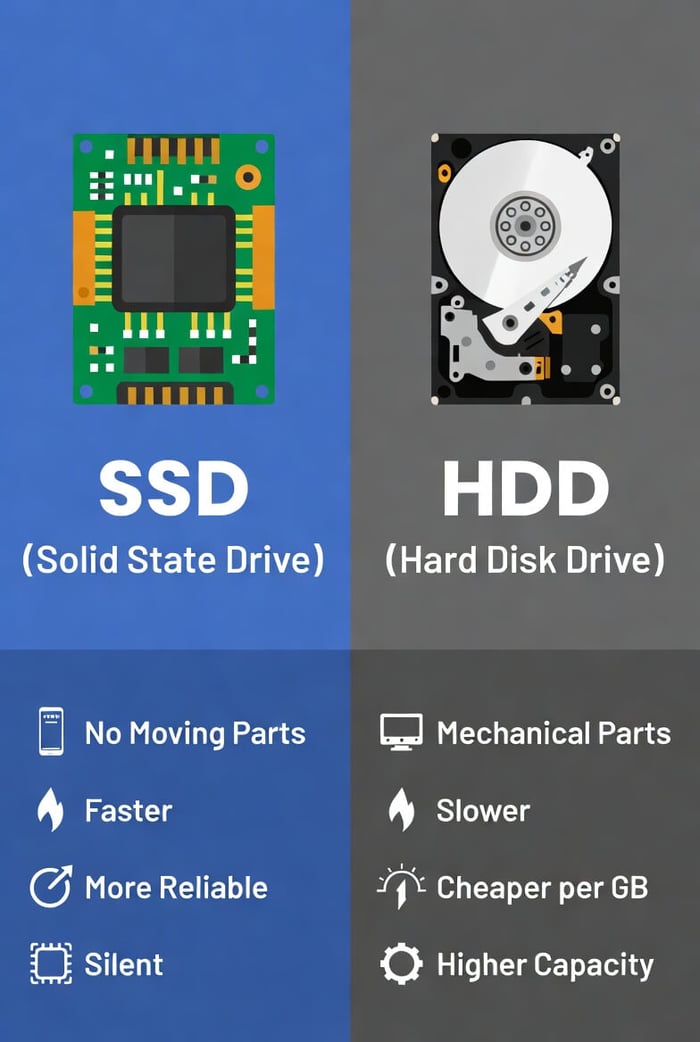
The Simple Difference
An HDD, or hard disk drive, reads data from spinning disks. An SSD, or solid-state drive, uses electronic memory with no moving parts. SSDs generally open programs and load files faster; the exact difference depends on the drive and computer. [1]
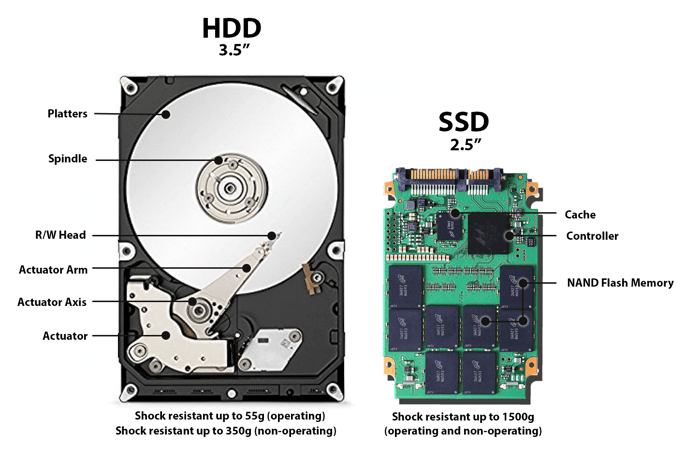
Illustration credit: Backblaze, “HDDs vs SSDs”. Its older price examples are not current buying advice. [2]
Which Is Better for Your Use?
- Everyday work: choose an SSD for Windows or macOS, apps, and files you use often.
- A laptop you carry: an SSD has no spinning mechanism to damage through a bump. It can still fail or be damaged.
- Large photo or video collections: compare the cost of the capacity you need. An HDD may be more economical.
- Gaming: an SSD helps loading times, but it does not by itself guarantee more frames per second.
- Backups: either type can hold a backup. Independent copies matter more than choosing one drive type.
What About SATA and NVMe?
You may see SATA and NVMe on SSD listings. These describe different ways the drive connects and transfers data. NVMe models can be faster, but your computer must support the correct drive and connector. Do not order a replacement based only on how it looks.
If you are unsure, give the seller or technician the computer’s exact model number. Compatibility comes before a speed claim on the package.
Can an SSD Improve an Older Computer?
Replacing an older main hard drive with an SSD can make startup and everyday use feel more responsive. It will not solve every problem, such as an unsupported operating system, overheating, or too little memory. Compare the full upgrade cost with the computer’s condition.
Back up important files before any replacement. Ask whether the work includes moving your files, reinstalling programs, and securely handling the old drive.
Does an SSD Need Maintenance?
Let Windows manage the appropriate maintenance through Defragment and Optimize Drives. Windows uses different optimization for SSDs and hard drives; you do not need a separate “speed booster.” [3]
Neither Drive Type Replaces a Backup
Both can fail. Do not assume an SSD keeps your files safe forever or a hard drive is unsuitable for backups. Keep copies using the 3-2-1 rule. [4]
Need help checking compatibility or deciding whether an upgrade is worthwhile? Ask PC Ninja.
Sources
Sources checked October 9, 2026. Numbered links above match these references. Buying and service recommendations are PC Ninja’s advice, not guarantees.
- [1] Microsoft. All about SSD, HDD, and storage types. Accessed October 9, 2026.
- [2] Backblaze. HDDs vs SSDs. Accessed October 9, 2026.
- [3] Microsoft. Defragment / optimize your data drives in Windows. Accessed October 9, 2026.
- [4] CISA / US-CERT. Data Backup Options. Accessed October 9, 2026.